Συνολικές προβολές σελίδας

Αναγνώστες

Σάββατο 12 Νοεμβρίου 2011

An effective 10-20m DX antenna for deed restricted lots…

The simple 15′ vertical antenna shown mounted on the railing of our second floor deck has produced almost 200 countries worked around the world… VQ9′s in Chagos and 3B8′s on Mauritius in the Indian Ocean, TX0DX on Chesterfield Reef, VK0MM on Macquarie Island in the Antarctic region, BQ9P on Pratas Island off Taiwan, ZM7ZB on Chatham Island in the South Pacific along with FO0AAA on Clipperton, 9M0OO on Spratly Island in the South China Sea, JT1CO in Mongolia and on and on. What I hear, I can usually work with this little wonder and the small size and profile make it feasible for use in deed restricted neighborhoods.
A radio amateur friend and antenna designer came up with a simple design for a 10 meter vertical, which another friend and I modified to make work for the 14, 18, 21, 24 and 28 MHz ham bands. Its performance surpised us, and I’ll share it with you, in case you too are looking for a simple, inexpensive DX antenna that really performs well.
Main Antenna Concept
The basic concept is to put up a piece of aluminum tubing with a telescopic section held by a small hose clamp to adjust the height. By attaching the center conductor of a coax feedline to the tubing, and the shield of the coax to a couple of radials from the base of the tubing you can load the vertical across quite a broad range of frequencies.
Of course, with a vertical element of approximately 15′ this is a non-resonant antenna for the 10, 12, 15, 17 and 20 meter bands. I chose this length on purpose to allow the system to be tuned to resonance with an antenna runer.
Tuning
Since the SWR in an antenna system of this type will be relatively high, an antenna tuner unit will definitely be required. You may need an external ATU if the one in your transceiver can’t handle the impedance mismatches involved. Here at K7ZB, I drive my TS570 (which has a built-in ATU) thru the amplifier, which then drives a high power ATU to the antenna. I put the SWR/Power meter between the amplifier and ATU to ensure a good match for the amp, and in cases where I run barefoot without the amp, I can still use the ATU to assist the transceiver’s ATU in ensuring a good match.
In this way, everything is matched for maximum power output: from the transceiver to the amp, and amp to the antenna. And, even though the SWR’s are high at the feedline and the antenna, it doesn’t matter because the system is matched with the ATU.

Mounting Scheme
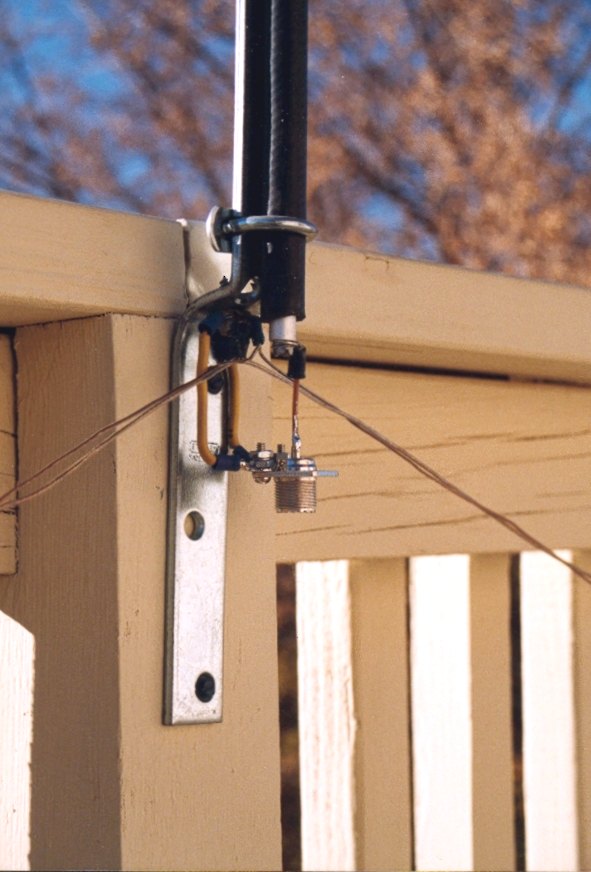
The picture below shows the details of the mounting scheme.
Feed point close up This picture shows the center conductor of the vertical connected to an SO-239 female coax connector. I used two pieces of insulated #14 AWG solid copper wire to provide a stiff means of supporting the connector to the metal bracket. Note that there is no true ‘ground’ connection to this antenna. The ground side of the connector simply connects to the hardware bracket, to which the two radials are connected. The bracket looks like a simple piece of offset metal used to mount a small flag pole or the like.
The two ~15′ radial wires are held to the bracket with a large sheet-metal screw, so the bracket is connected to the coax shield. Electrical isolation from the center conductor of the coax connected to the vertical element is provided by an insulating rubber sleeve. This is a piece of neoprene fuel line chosen because the dimensions fit the aluminum rod inserted into the lower 14″ of the aluminum tubing. However, we found the electrical isolation properties of neoprene fuel line leave a little to be desired at the high SWR’s of this system. After driving this vertical with 500 watts at high SWR in the middle of one of the DX Contests, I punched through the insulation. Obviously the original 10m antenna design was intended for lower power and lower SWR’s! This problem was solved by wrapping the neoprene sleeve with several layers of Teflon tape (the kind you buy for plumbing work at the hardware store). I also added a couple of layers of electrical tape (600V rating) for additional safety. These modifications are shown in the picture below with the vertical tubing removed – you simply add the tape over the sleeve. The vertical element is then secured to the bracket by a pair of hose clamps of suitable size.
A construction detail shown in the picture below is the solid aluminum rod that fits inside the lower 14″ of the main 8′ length of tubing. The solid rod is inserted at the bottom to ensure a good tight connection for the sleeve. This rod end can be drilled with a blind hole for a self-tapping sheet-metal screw to secure the solid copper wire from the center conductor from the SO-239. The tubing is secured to the rod with a hose clamp just above the top of the bracket.
Vertical antenna
A tip for ensuring good clamping force with hose-clamps and hollow tubing is to slit the tubing about two inches up from the bottom on opposing sides with a hacksaw. This will allow the clamps to grip tightly enough to prevent slippage. Also, insert a solid piece of rod about 8″ long inside the smaller diameter telescoping tube at the top of the vertical to prevent that tube from collapsing. The upper telescoping tube is adjusted to about 15′ overall length to give proper loading across all bands.
The final photo below shows the completed vertical attached to the railing with the coax looped about 6 times to give some measure of RF choke action to keep RF from entering the shack on the braid. I secured the coax loops with plastic wire-ties to the railing support to stress relieve the connector. You can also see the tubing and small hose clamp just above the neoprene sleeve along with the two larger hose clamps gripping the sleeve and rod to the bracket.
It is quite easy to remove the vertical tubing element and stow it when you are not operating, as I now do, thus fulfilling the need for an unobtrusive HF antenna.
Vertical antenna feed coax
All in all, a cheap and effective radiator for the higher HF bands!

HF Aerial Matching Unit


Following on from the recent 10 meter halo aerial project, this simple matching unit will allow the aerial to be used right across the 10m band without the need to physically adjust the elements, and offers a virtual 1:1 VSWR at 50 ohms impedance to the transmitter. The unit is designed to be positioned in the shack adjacent to the VSWR meter and the transceiver.
Construction
The unit is best constructed in an enclosed metal box. I used what was to hand, being a discarded aluminium alloy enclosure approximately 3" x 8" x 5" (h-w-d). The two variable capacitors can be "broadcast receiver" type with a maximum value of around 300 to 500 pF - these have a plate spacing which is usually good to about 100 Watts of RF in this configuration. If you want to run more power, then choose capacitors with a suitably wider plate spacing.
The switch should be a "Yaxley" type rotary switch. Again, if you are running less than 100 Watts, anything other than a real sub-minature one will be sufficient. For full legal power limit I would suggest using a ceramic type rotary switch. The coil is self-supporting and consists of 4 turns of 18 swg copper wire, tapped at each turn, and wound to a diameter of 1", with the turns spaced 0.25" apart. Any kind of wire can be used, i.e. tinned, enamelled, etc. I used the earth wire from some offcuts of twin & earth mains cable.
Provide two suitable connecting sockets on the rear of the unit - I used SO-239s as these were to hand, and fitted in with my existing HF plug and socketry in the shack. BNCs would be fine if these are to hand. Use control knobs that have pointers, and apply a marked scale to the front panel for both capacitors and the switch.

Adjustment and Use
Once the wiring inside the box is completed, close the lid. This will prevent anything from physically interfering with the wiring, and reduce any radiation of RF within the shack. If you have a grid dip oscillator or antenna analyser, this can used to roughly set up the matching unit controls. Otherwise, connect up as per diagram 2, set all controls to mid-way, and tune to a convenient spot on the 10m band.
Take a good long listen on the frequency to ensure that it is not in use by another station - you may only hear one side of any QSO that might be taking place. Adjust the transmitter for minimum power output, key the transmitter with a continuous carrier for just a couple of seconds at a time whilst twiddling the matching unit controls. You are looking for a dip in the reflected power, i.e. to reduce the standing wave ratio to as near to 1:1 as possible.
If you cannot obtain a good low reading just by swinging either or both of the capacitors, switch to another coil tap setting and try again. Once you have found the best match, make a note of the frequency and the settings of all three controls. Do this at several intervals across the band, and you will see a pattern emerging of where the controls need to be set for a given frequency. The losses in this matching unit are pretty low, but it is nevertheless a compromise. However, it will enable you to go from one end of the band to the other without having to go and physically adjust the aerial. Although primarily designed for 10m, it can be used on other HF bands to good effect.

EZ-Tuner

EZ-Tuner Interior
Because of its complexity, I designed the EZ-Tuner with ease of servicing in mind. (Wish I could say the same for most of my other homebrew projects!) The above view shows the front panel folded down for access to the stepper motors, rotary solenoid (which turns the inductor switch), and +24V power supply, which mounts on the sub-panel. As shown below, all RF components are housed in a shielded sub-enclosure. Should I need to replace any of these parts (knock on wood!) the rear panel detaches by unsoldering two wires and removing some screws.
EZ-Tuner RF enclosure
From left to right in the above view is the 35-492 pF output capacitor, the dual-coil inductance, the two-pole 11 position inductor switch, and the 19-202 pF (per section) split-stator input capacitor. A 4:1 toroidal transformer is mounted just behind the bandswitch, and behind it is a DPDT Kilovac vacuum relay, used for on-line/off-line switching. Barely visible behind the output capacitor are two 50pF high voltage fixed capacitors.
Below is a view of the chassis underside, showing the EZ-Tuner's three printed circuit boards: a microcontroller board (center) and two identical stepper motor driver boards. The PC boards mount on small tapped metal spacers, and connect via Molex-type connectors and headers. I took the precaution of making a few spare circuit boards, so that boards can be swapped in a few minutes.
The wiring harness uses teflon-insulated wire, which doesn't melt at soldering iron temperatures. Borrowing an idea from my old Collins rigs, I used all stainless steel hardware, with pan-head phillips screws. Also shown in the below photo are the +5V regulated power supply (left front), a small "beep" speaker (right front), and an RFI AC line filter (right rear).
EZ-Tuner underside
Now, here are a few hints for builders and some more details about the EZ-Tuner's inner workings:

 "Measure twice, cut once." It pays to heed the old carpenter's adage when doing metalwork. Drilling the aluminum chassis plate (right) was tedious, even with chassis punches and a drill press. The chassis plate has a total of 64 holes. The twelve threaded metal spacers are for mounting the three printed circuit boards.
EZ-Tuner Chassis
.Setting the Inductor Taps
Setting the inductor taps is easy when using an MFJ-259B analyzer and the geometric resistance box (GRB) designed by Frank Witt, AI1H. Frank's neat little gizmo is basically a series of switched precision resistors, which simulate low or high resistance loads, up to a 32:1 VSWR.
To set the taps, one attaches the GRB to the output of the tuner and the MFJ analyzer to the input. Then, after setting the variable caps to the calculated values for matching a 50 ohm load (allowing a few pF for stray capacitance), one simply moves the coil tap around until a 1:1 match is found. B&W coil taps make this a painless chore, since they mechanically clamp the inductor and are easily moved.
When the left photo was taken, I was only trying to ballpark the tap locations. I tweaked the taps to their final positions after installing the back panel and compartment cover. After finding the final positions, I soldered the taps to the coils to assure a good low-resistance bond to the inductor
Sometimes, the parts layout won't let you put a tap just where it's needed. In these cases, you can add a smidgen of inductance to the tap itself, as shown in the right photo.
Coil Tap with added inductance
Tektronix silver & ceramic terminal strip
A half-century ago, the Tektronix Corporation elevated the humble terminal strip to an art form. The EZ-Tuner uses ceramic and silver Tektronix terminal strips (left), salvaged from old Tek oscilloscopes. You won't see these in your MFJ tuner! Click HERE to see the original 1958 patent on the terminal strips!
It's important to use silver-bearing solder with these terminal strips to prevent the silver from unbonding from the ceramic. Tektronix thoughtfully attached little spools of the special solder to the chassis of their scopes, for use by service techs. Ahh, for the good old days!
The right photo shows twin 50 pF ceramic 5 kV capacitors, which provide an extra 100 pF of output capacitance to the 492 pF variable capacitor on 160 meters. The ceramic caps are mounted on a small L-bracket affixed to the rear of the variable capacitor and are automotically switched into the circuit with a Jennings RF-3A vacuum relay.
Relay-switched output capacitors
Capacitor mounting block
In a T-network, both the stator and rotor plates of both variable capacitors must be insulated from ground. I fabricated mounting blocks from teflon scrap I found on EBay and used Millen ceramic shaft couplers from my junque box to isolate the capacitor shafts. I knew I'd find a use for them one day!
Shown at right is a closeup of the 4:1 bifilar-wound toroidal transformer, used to transform the unbalanced output of the tuner to a balanced output. The toroid is wound of #12 wire (insulated with teflon sleeving) on three Amidon T-200-2 (red) cores. The cores are wrapped with high-temperature fiberglass tape.
Recent editions of the ARRL Handbook show a nifty antenna tuner with the toroid connected to the tuner's input, where it always sees a 50 ohm impedance. I finally ruled out that option, because it requires the toroid to always be in the circuit, even for unbalanced loads.


Toroidal 4:1 Balun
Project History
Although I didn't start building the EZ-Tuner until March 2000, the idea had been in the back of my mind for several years before then.
EZ-Tuner
I'd long wanted an autotuner that could handle 1500 Watts, because I have several amplifiers in my vintage radio collection, spread over several operating tables, and I was constantly running back-and-forth adjusting my manual tuner. Also, my old homebrew tuner was showing its age, and I knew it was going to have to be replaced or rebuilt before much longer.
Unfortunately, there are no commercial legal-power ham autotuners on the market. Most built-in transceiver autotuners are rated at 200 W or less, and most of those can handle VSWRs of only 3:1 or so. If I wanted a high power wide-range auto tuner, it seemed clear I had little choice but to build one from scratch..
Antenna Tuner
This trusty old workhorse dated from 1975 and had melted inductors and arced capacitor plates.
Many of the best commercial autotuners, like the SGC-230, use relay-switched toroidal inductors and fixed capacitors. While these work well, it didn't seem practical to me to scale up the concept to the 1500 W level. My best bet seemed to be a conventional variable-capacitor tuner, controlled by stepper motors. Furthermore, I didn't like the idea of a fully automatic 1500 W tuner that "hunted" for a minimum VSWR using a trial-and-error search alogorithm. (And I was pretty sure my homebrew 8877 amp wouldn't like it either!) A manually tuned "memory" tuner with stored settings seemed less likely to lead to inadvertent amplifier damage.
Basic Stamp BS2sx
About six months before I started on the project, I stumbled across the newly-released Parallax BASIC Stamp BS2sx. With 2000 program steps, 50 MHz clock speed, and 16 I/O ports, it seemed to have enough horsepower for my project. Also, I had used a BASIC Stamp in an earlier QRP project, and really liked its ease of programming, which for me was important. One big decision out of the way!
I started the project by designing a stepper motor controller. Although one can buy commercial controller boards, most seemed to be too expensive, had too many unneeded features, or weren't suitable for RF use. For my design, I borrowed ideas on the basic waveform circuitry from a "Nuts and Volts" article, and added an auto-timeout feature and optically isolated motor drivers, which seemed like a good idea for strong RF environments.
Stepper motor driver
The 3x5 inch stepper motor controller circuit board was designed using "Circad 98," a great piece of software by Holophase, Inc., Shown here is a "Rev. C" board which has a nice silkscreened component legend and solder mask.
Once the stepper motor drivers were built and tested, I started thinking about the features I wanted. I usually begin a homebrew project by sketching out the front panel, since playing with the imaginary knobs and switches on paper helps me focus on the features I really want.
Front Panel Sketch
Here's the original front panel design, drawn at work during a boring committee meeting.
Once I had a general idea of the specifications, I started writing the software code, an effort that took the better part of six months. To test and debug the code as it was being written, I lashed together a breadboard of the control circuitry, as shown below. The BS2sx microcontroller is buried under the rat's nest in the middle.
work-in-progress on the W8ZR Mark II tuner
At this point in the project, I planned on using a roller inductor in the tuner (which is why there are three stepper motors in the photo.) Eventually, I decided on a switched fixed inductor to minimize losses and to facilitate rapid bandchanging. I wanted to change bands in seconds, and not wait for a rotary inductor to crank through its turns.
Once I had the software more-or-less working, I designed another PC board containing the BS2sx module, frequency counter, and relay drivers. Final testing of the completed controller circuitry was done using a mockup of the RF section, as shown below. For testing, I fabricated a temporary "front panel" out of sheet aluminum to hold the controls and mounted the switch and variable capacitors on a scrap aluminum plate.
autotuner mockup
Finally, it was time to start designing the RF section of the tuner, and this proved to be a much harder job than I'd anticipated. I started by bringing myself up to date on antenna tuner design, with several excellent QST and QEX articles by Bill Sabin, W0IYH, Dean Straw, N6BV, Frank Witt, AI1H, and others. There sure are a lot of subtleties for a device that only consists of two capacitors and an inductor!
I eventually settled on the basic T-network because of its versatility, but now I ran into a stumbling block. Virtually all the T-network tuners I saw used roller inductors, with continuously variable inductance.
My tuner, by contrast, was going to use a fixed inductor with an 11-position switch. What 11 inductances should I choose to maximize the matching range on all 9 HF bands, while also minimizing power loss (heating) and high peak RF voltages? I didn't even know how to go about answering that question.
By now, summer of 2001 had arrived, and I had three weeks to spend at our family vacation cabin in the Montana mountains. When I wasn't hiking in the wilderness or operating W8ZR/7 in the cabin hamshack, I had several hours a day to spend on the problem. Fortunately, I had N6BV's excellent computer simulation programs AAT.exe and TLA.exe, which could generate T-Network solutions for virtually any impedance. Unfortunately, for each impedance and frequency, there are about a zillion matching combinations of inductance and capacitance, each with different losses and peak voltages. I needed some way to sort through all that information, so I could pick out the eleven best inductances for my tuner.
Eventually, I was able to identify patterns in the T-Network solutions, which could be displayed in two frequency-independent graphs. One graph showed curves of the network values for different load impedances, and the other showed the corresponding network losses. Armed with these graphs, it was then a straightforward exercise to select my tuner inductances. (See the figures in April 2002 QST for details.)
By then, I could hardly wait to get back to Oxford to begin building the tuner. The actual construction only took about three months of weekends and evenings, followed by a month of software debugging and ironing out wrinkles. By the end of November 2001, the EZ-Tuner was finally completed!
EZ-Tuner Chassis Module
Here's the RF sub-assembly, prior to final wiring, ready to be mounted in the cabinet.


Stepper Motor Hints

If you've been rounding up parts for your EZ-Tuner, you've undoubtedly learned that the Ledex rotary solenoid that turns the inductor switch is pretty scarce. Also, you've probably discovered that dual-shaft stepper motors cost $$$ when purchased new, and don't turn up very frequently on EBay or in surplus electronics catalogs. Well, don't despair. There is a solution. In fact, here's one way to kill both birds with one stone. First, let me state the problems more fully.
Problem 1: The EZ-Tuner uses two dual-shaft stepper motors to turn the variable capacitors. The front shaft is connected to the variable capacitor, via an insulated shaft coupling, and the rear shaft holds a slotted disk which is used to detect when the capacitor is full meshed. The challenge is how to adapt a single-shaft stepper to do the job of a dual-shaft stepper.
Problem 2: If you've decided to use a stepper motor to turn the inductor switch, and if you've read FAQ #14, then you already know you'll need to gear down your stepper. The challenges are (1) to choose the right gears to turn a 30 degree indexed switch, and (2) to design a convenient easy-to-build gear assembly which doesn't take up much space but which leaves room for your limit switch and shaft coupler.
E.T.O/Alpha to the Rescue! Below, is how the designers at E.T.O solved the problem in their commercial autotune MRI amplifiers. In these amplifiers, single-shaft stepper motors were used to turn several rotary switches and a variety of air- and vacuum-variable capacitors.
 A single-shaft stepper motor and two non-metal gears make a simple assembly that is perfectly matched to a 30 degree (11 position) rotary switch. The stepper motor is fixed to a 3 in x 3.25 in x 0.063" aluminum plate, which is attached to the panel with three 1" threaded aluminum spacers. The gears and limit sense wheel (the circular disk underneath the smaller gear) fit in the 1" gap between the panel and aluminum plate, so that the entire assembly adds only 1 inch of depth to the stepper motor.
The gears are 32 pitch. The small gear is 24 teeth, 0.75" diameter, and the large gear is 72 teeth, 2.25" diameter. The combination results in a reduction ration of 1:3, which reduces each step of a common 1.8 deg/step stepper motor to 0.6 degrees. Fifty steps will turn the rotary switch exactly 30 degrees, or one position. Note that a panel bearing (not shown) is required to support the front shaft of the large gear.
.
At the left is a closeup of the limit wheel (note the small slot). If you want to duplicate this idea, you should attach the wheel to the large gear, rather than the small gear shown here. In this setup, the wheel is fixed to the hub of the small gear with small screws. However, the simpler (though admittedly less elegant) approach that I used is to fit a rubber grommet into the wheel and simply slide the grommet onto the shaft. Once the wheel is aligned properly, a dab of silicone caulk keeps the grommet from moving. (If you really want to get down and dirty, you can use a soup can lid for a wheel, and drill a small hole for the light beam.) Optical interrupters are available at Jameco, All Electronics, Digikey, etc. and cost only a dollor or two.
As shown at the right, a mechanical switch can be used to sense the end of rotation of the switch or variable capacitor. The electrical requirement is merely to ground a wire to the controller when the capacitor or switch is at its "home" position. In an optical detector, the wire is grounded when a phototransistor detects a light beam from the slit in the sense wheel. In the setup at the right, a microswitch is closed by a pin attached to the shaft of the gear.
At the left is another view of the E.T.O stepper/gear mechanism. A good source of gears (and almost all other hardware) is McMaster-Carr (http://www.mcmaster.com/). Check page 921 of their catalog, or search for "Spur Gears & Racks." You can buy them in stainless steel, aluminum, or acetal (non-metallic) plastic. New gears are rather expensive, but they pop up frequently in surplus catalogs and can often be scavenged from other equipment.

MINI T MATCH TUNER


Recently after building my SW-30+ from Small Wonder Labs, I found out that the little BLT tuner I had been using for my QRP operations would not tune my 40 meter Extended Double Zepp (178' centerfed with 450 ohm balanced line) on 30 meters. Not to fault the BLT, as it is a fine little work of art to say the least, my antenna just happened to be out of limits for it. So what could I do to put the new 30 meter rig on the air ? Well, for that evening, I managed to get on the air using my old MFJ-901B which has no meter, but does have a resistive bridge and LED indicator that I added for SWR indication. With this setup, I easily managed to get a match on 30 meters and was making contacts within minutes. I already had the SW-40, and the SW-20, and the little BLT worked just fine on those 2 bands, but I thought that it would be nice to have a very small, wide range tuner for working several bands. I looked over several designs, and then thought I had better look in my junk box to see what I had on hand before I decided on what to build. Well, I managed to find 2 indentical poly variable capacitors that checked out to range from 15 to 300 pf, and they even had 1/4" shafts for mounting knobs. Don't ask where I got these, as I've had them for a long time (I hear that Emtech carries them) but had forgotten about them even being here ! Then I thought that they would be perfect in a simple T match circuit. The T match isn't the best or most efficient tuner circuit around, but it will tune darn near anything you connect it to ! With that range of capacitance, I figured I should be able to build a tuner that would at least cover 10 through 80 meters. So I started looking around for inductor ideas, and first thought about toroidal inductors, but didn't have one on hand to wind the amount of inductance I was looking for on. So I decided to wind the inductor on an insulating coil form, and in this case I used some thin wall 3/4" pvc pipe which is slightly larger than 1" outside diameter. Then I figured that to cover down to 80 meters I would need somewhere around 25 uH of inductance. So my Hamcalc program (thanks Murph !) made an easy job of designing the coil. It told me to wind 36 turns of #20 enamel wire on a form of 1.09" to achieve 25 uH. So I wound the coil, and placed a tap every 3 turns and wired it to a 12 position rotary switch I picked up at Radio Shack. I then mounted the caps, and prewired switch/inductor combo into a little enclosure I had sitting around that wsn't a lot bigger than the BLT tuner. For SWR indication, I duplicated the bridge circuit in the BLT tuner and used a super bright red/water clear LED as the indicator. The cpas had no mounts of any kind built in, so I mounted them with double sided tape long enough to hold them in place and then anchored them with hot melt glue. After mounting 2 surplus SO-239 chassis connectors, I finnished wiring the thing up, and the labled the front and rear panels with my electronic label maker and clear lable tape. Now for a test drive. I dug out my trust old MFJ-259B antenna analyzer and connected it to the input of the tuner, and connected my 40 meter zepp to the output. I tried various frequencies, and was able to get a good match on basically every one I tried from 80 meters on up to 10 ! So, I then tried it with my SW-30+, and right away got a good match with the LED going completely out, and was on the air making contacts within minutes. I now have a functional tuner that will tune almost anything, and it will fit in my coat pocket with room to spare ! I know that my BLT is a more efficient design, and will tune in the field with the right antenna, but with it and my little homebrew Mini-Tune in my bag, I will be able to match just about anything I decide to use ! I have even used it with my Icom 703 on 80 meters with up to 10 watts and no apparent problems so far, and have also found that it will load my zepp on 160 but I have to reduce power to prevent arching there !


SCHEMATIC FOR THE MINI T - GUESS YOU CAN TELL I LIKE TO BUILD TUNERS !


The schematic for the Mini T Match Tuner shows that it is nothing more than a standard T match circuit just like the circuit used in most commercial tuners these days, with the exception that this is a miniature sized version.


INTERNAL WORKINGS OF THE MINI T MATCH TUNER


Here's a shot of the internal parts layout in the Mini T Match. As you can see, this is a very compact tuner that will travel along with you almost anywhere and will tune almost anything including the proverbial bedsprings !

a Portable Antenna Matching Unit

Introduction
When I started going 'bicycle portable' with my Elecraft K2 QRP transceiver, it became apparent that I needed a single unit that would provide the combined functions of dummy load; SWR bridge; multi-band antenna tuning unit (ATU) [or, more correctly, antenna matching unit]; and balun. 
The need for a balun arises because, when operating portable, I often use either a vertical antenna or a doublet, so the ATU needed to cope with both balanced and unbalanced loads. 
The resulting design is described here.  The Carlton was first used in the Power Management Challenge with an inverted V doublet having a 40 m top, with the apex at 7 m, and 10 m of low impedance balanced feeder (well, speaker cable, actually).  The ATU successfully matched this antenna on all amateur bands 1.8 to 28 MHz.
Front View
The ATU is built into a matt black box of ABS plastic having external measurements of 198 x 112 x 64 mm (Maplin part number BZ75S).

Main Circuit Diagram
The circuit diagram of the Carlton is shown above.  Details of the Pi Network are provided below.  I am grateful to Ha-Jo Brandt DJ1ZB for the circuit of the tuning indicator which I have found works very well (see Page 63, G-QRP Club Circuit Handbook, 1983).  For the germanium (Ge) diodes, I used type OA95 - but OA81 or OA91 would probably work fine too.  For the silicon (Si) diode, I used a type 1N4148 which, in this circuit, is used to limit the current through the meter.  The 50 ohm resistors should be carbon types.   For each 50 ohm resistor, I used two 100 ohm (2 watt) resistors in parallel, obtained from Sycom Trading, although 1 watt components should suffice when using QRP (5 watt) transmitters.  The moving coil meter was obtained from Maplin, part number LB80B, (internal resistance of 675 ohms, graduated '0' to '5').
In the TUNE mode (and with the transmitter 'ON') the meter indicates relative reflected power.  The 1.8 k resistor sets the maximum meter deflection, using the silicon diode as a voltage limiter (0.6 volts).  The 47 k resistor is used to provide FSD when the antenna is disconnected or severely mismatched.  Under these conditions, the power amplifier stage in the transmitter is automatically protected by virtue of the resistive components in the bridge circuit which maintain a safe load for the transmitter under all load conditions.

Pi Network Circuit Diagram

The circuit of the pi network is shown below.  A 12-position rotary switch (obtained from Sycom) was used to select the tapping points.  L4 and SW5 provide additional inductance when using electrically short antennas on 1.8 MHz (for example, the 'MF' switch position is required when tuning my G5RV-sized doublet for 160m).   The table included in the circuit diagram indicates the typical switch positions for each of the amateur bands, but the exact switch position required for a given band will depend upon the impedance presented by the antenna.  SW6 and SW7 and the associated 680 pF capacitors are required to provide sufficient tuning range on 80/160 m, but these may be omitted if operation on these bands is not required.
port_atu2.bmp (17790 bytes)
Lack of space in the box required the use of space-saving coils wound on plain 0.1 inch matrix board.  Coils A and B were each wound on the matrix board in the form of a solenoid.  Coils C and D were also wound on matrix board, but were wound 'flat'.   Coils L1; L2; L3 and L4 were wound on T50-2 and T80-2 ring cores (see below).
The ATU may be used with unbalanced antennas (such as marconi antennas, or end-fed wires); or with balanced antennas (such as doublets and half-wave dipoles).  I am grateful to John G3WGV who, in an Email  to the 'Summits On The Air' (SOTA) Email reflector pointed out that baluns can be used very successfully to couple balanced feeders to unbalanced ATUs.  (For over 30 years, I had avoided such a configuration due to my mistaken belief that a balun could only be used successfully if the impedances presented at each of the two ports were resistive - not so!)
A novel feature of the balun transformer in the above circuit is the use of a changeover switch to select antenna-to-source impedance ratios of 1:1 or 4:1.  As noted by G3WGV in his Email to the SOTA group, having the choice of 1:1 and 4:1 baluns greatly improves the ability of the antenna matching unit to cope with the wide range of impedances often presented by doublets used for multiband operation.
Inside View
The above picture shows how I mounted the variable capacitors in an opposing configuration.  Ideally, the panel knobs would be forward-facing, but the size of the box would not permit such luxury!  Nevertheless, I have become used to adjusting the matching unit, and no longer find it tedious to adjust the side-mounted controls for the best match (i.e. minimum meter deflection while in the TUNE position).
Constructing the balun
The balun transformer, T1, is wound on a T130-2 ring core. The wire gauge is not critical: multi-strand wire salvaged from a length of mains flex would be fine.  It helps if the conductors are colour-coded.

Start by twisting three wires together at about one twist every 15 mm. Wind twelve turns on the toroid, and label each of the three wires at the start of the winding with the identification numbers 1; 3; 5.  Then label the other end of each wire with 2; 4; 6 respectively. Refer to the circuit diagram to ensure correct installation. Neither the number of turns, nor the direction of the turns, is critical in this design.  During testing, I found no difference in performance between a transformer of 10 turns, and another wound with 14 turns.

Balun Diagram                Balun Picture

Construction of coils A; B; C; and D
Each of the coils was wound as shown below.  Note that the coils in my ATU occupied different relative positions to one another.  Nevertheless, the diagram does serve to show the dimensions of each coil.  For all coils A - D, I used plain, solid-conductor copper wire that just happened to be a clearance fit in the holes of the matrix board.  Of course, there is nothing particularly special about the size of coils that I ended up with - they just happened to work!
port_atu4.bmp (15566 bytes)  Coil A: 11 turns, 3 clear holes.
Coil B: 13 turns, 4 clear holes.
Coil C: 11 turns, 14 clear holes.
Coil D: 15 turns, 19 clear holes.
Switch and Coils Switch and Coils 
These pictures show the actual contruction of coils A; B; and C after having been mounted on the switch assembly, but prior to wiring.
Construction of Coils L1; L2; L3; and L4L1 through L4 are single-layer coils, wound using 26 SWG enamelled copper wire on ring cores of '-2' material.
L1: 17 turns, 26 SWG on T50-2 core.
L2: 23 turns, 26 SWG on T50-2 core.
L3: 23 turns, 26 SWG on T80-2 core.
L4: 38 turns, 26 SWG on T80-2 core.
 Feedback from other constructors and correspondents
25/11/2002
Obtaining air-spaced variable capacitors is getting more difficult (and more expensive) these days.  The cheapest source is from discarded portable radios, but Mick Brett, M3JTX writes:
"A company called Mainline Electronics who make Jackson Brothers capacitors list a LA1 cap priced at £9.98 ex. vat.  This is only 400pf but they will make a 600pf to special order althougth this increases the price to £25 each plus vat.  Postage and packing is £3.75 per order.  I did not think this too excessive and they are really nice capacitors.  Delivery is about three weeks and you can view there webbsite at www.mainlinegroup.co.uk"


23/05/2003
Mike Brett, M3JTX writes:
"Hi Steve.  Just thought you might be interested in seeing my version of your portable ATU.  As I built mine for base station use its in a steel case so it probably weighs far more than your portable unit.  I use it on the HF bands on SSB only but even at my restricted power of only 10 Watts.  I have managed to work in to Europe as well as most of the UK.  The SWR is really low and although when finished it costs approx £180, it was money well spent. It really is superb. Thanks for all your help and 73's"

m3jtx_t.jpg (77448 bytes)                     m3jtx_f.jpg (41877 bytes)
Click on the aboves thumbnails to see the full-size pictures.
I then went on to ask Mike how he made such a professional job of the front panel.   Mike writes:
"Glad you like the ATU as it did take me rather a long time. The front panel was made as I make all my panels.  First I design the layout on my computer using powerpoint.  This is easy once you get the hang of it.  Then I print it on to thick cartridge paper.  I then cut it to size and punch out the holes for switches etc.  It is then laminated and finally attached with double sided tape.  As you say, it does give a neat finish."

How to Use an Antenna Tuner

WHAT IS AN ANTENNA TUNNER?
You have to learn how to hook them up to your tranceiver properly and tune them correctly to make your radio "think" that it is feeding it's signal into a "perfect or near perfect 50 ohm laod called your antenna!

An antenna tuner, (transmatch), doesn't really TUNE your antenna OR ANY PART OF IT!

What an antenna tuner or transmatch does do, however, is transform the impedance at the antenna feed output at the radio to a value that your transceiver can handle, (typically 50 Ohms).
When thinking about antenna tuners and SWR, it's important to remember that
the tuner has no effect whatsoever on the SWR between itself and the antenna.
It's the SWR between the transmitter and the tuner that is changed with the tuner controls.

In layman's terms, all a tuner does is act as a kind of adjustable impedance transformer between the radio and the antenna. It takes whatever impedance the antenna system presents, up to the design limits of the tuner, and attempts to convert it back to 50 Ohms--or something reasonably close to that value for the transceiver. When the transceiver "sees" a 50 Ohm impedance, it is able to load or produce it's maximum designed RF output into the system because it is designed to operate into a 50 ohm load.
Your rig "thinks" it's seeing a 50 ohm antenna on it's output!
That power is transferred through the antenna tuner, to the feed line and, ultimately, to the antenna--
minus any losses incurred along the way.
If you have high loses and a poor excuse for an antenna, you will have a poor excuse for a good signal no matter how well your tuner "tricks" your radio.
Much of the power will be lost as heat in the tuner and very little will get to the other station!


These losses are the reason that the highest efficiency feed-line for each individual case is desirable and why some amateurs use ladder line on HF, which has the least loss per foot, which means maximum power at the input terminals of the antenna.
HOW TO HOOK UP AND USESo now that you have a better understanding of what an antenna "tuner" actually does, let's hook one up in a typical HF station.

In the block diagram below we have  typical Hf station setup consisting of, from lert to right,:

An HF Transceiver
A Linear or power amp
Low Pass Filter
Swr/Watt Meter combo
The Antenna Tuner
A Dummy Load
The MOST IMPORTANT PART......THE ANTENNA!
Take a look at the block diagram above and notice where the antenna tuner and SWR meter are in relation to the flow of the RF signal coming from the transceiver. (Note that the rf is actually flowing in both directions and not just toward the antenna).
PLEASE DISREGARD THE LINEAR AND LOW PASS FILTER FOR THE MOMENT! (Your station may not use them)

You will notice that.... first, from left to right, you have the transceiver, Swr/watt meter, ANTENNA TUNER and then the antenna on the output.
The rf moves from the transceiver to the SWR/WATT meter, then finally thru the "tuner" and out to the antenna.
You just learned how to hook it all up! Just remember that our goal is to make the transceiver think all is well, and in order to "read" the SWR and Power out pertaining to "all is well"......at the radio's output....the swr meter must be between the radio and the tuner. NOT ON THE ANTENNA SIDE!
Now Let's learn how to "tune" that "tuner"

Most antenna tuners have an inductance rotary switch and two capacitors. (refer to photo at top of page) The capacitors are often labeled ANTENNA and TRANSMITTER. In some antenna tuners the inductance switch is replaced with a continuously variable inductance, popularly known as a roller inductor.
Let's assume you're using a tuner with an inductance switch, because they are the most common.
SHOCK HAZARD!  NEVER TRANSMIT WITH THE TUNER COVER OFF AS IN THE NEXT STEP!
TURN OFF THE POWER TO THE RADIO!

Place both capacitor controls at their mid-range positions. Don't trust the knob markers if this is your first experience with the tuner!  If you are comfortable with the next procedure, remove the cover of the tuner and turn the knobs until the moving capacitor plates are only half meshed with the stationary plates. If the knobs are pointing to half scale with the reference markings on the knobs and front cover, consider yourself lucky.
If not, loosen their Allen screws and rotate the knobs so that they point to mid scale.
Re-tighten the knobs, replace the tuner cover and you're ready to go.
Turn the radio on and tune receiver to an un-used frequency
on the band you desire, listen for a few seconds, with the antenna and transmitter controls at mid scale, move the inductance switch to each of it's positions until you hear the loudest noise or signals coming into your radio. Then, rotate the antenna and transmitter controls until you get to the absolutely loudest noise or signal level on the radio. All three of these controls interact with each other so practice on several bands to get the "feel" of the procedure.
Select your final band of operation and repeat the procedure above. When noise peaks out using your ears and the S meter, your tuner settings should be very close for final operation.With your rig set to low power monitor the frequency to assure that it is not in use, send your ID then transmit a continuous carrier while you tweak the antenna and transmitter controls for the lowest reflected power reading with the highest output power as read on the Swr/Watt meter. You may find that you have to vary the position of the inductance switch a position or two either way to get your best match.
Play it safe and un-key before turning the inductor switch...un-key first....turn the switch...key up....repeat as needed until lowest SWR and maximum output. Be gentle to your radio; keep the key-down periods as short as possible. Depending on the impedance at the antenna input (and the overall design of the tuner) you may not be able to obtain a flat 1:1 SWR on all frequencies and bands.
Also important to remember is that your Swr will change, go up, as you tune further away from the frequency you used to "trick" your radio! So re-check and re-tune as needed as you move around the band.
You can get an idea of your SWR bandwidth by starting with your original frequency, and using the procedures above withlow power, (don't move any knobs or switches after best setting)....sweep or tune your VFO up and down the band while watching the SWR readings and note the frequency where the SWR reaches 2:1 at the higest and lowest frequency. Stop there!

Example: If your on 40 meters at say...7.262mhz as your starting point, and your SWR is 2:1 at 7.292mhz and the highest swr going the other way is 2:1 at 7.259mhz, then your "safe tuning range" without retuning the antenna tuner would be about 60khz.
Keep in mind to use very low power and ID because your signal may be heard for a split second as you tune across the band! When that transmit key is down, someone somewhere can hear you. Even a dummy load gets out somewhere!
Remember your "TRICKING" your way around a good antenna!

REMOTE ANTENNA TUNER

After doing a bit of messing around with frame and loop antennas I found that they all worked much better outside, but their very narrow bandwidth required them to be manually tuned. The obvious answer was some form of remote antenna tuner so that the antenna could be remotely tuned from inside my shack. This I did using a cheap (as always) RC-servo, of the type that is used for control of radio controlled models. Suitabale servos are made by Futaba and cost typically £7.50p (UK) - $11.00 (USA) - SEK 120 + Moms (SWE). 'Second user' (seen better days) servos are quite adequate in this application.
Above is the mechanical arrangement that I used with the packing crate antenna. I have also used this same technique with my frame antenna with 100% success. The three leads to the servo provide the 6 volt power and a control pulses for tuning. The three leads are coloured BLACK (-ve common), RED (+6 volt positive) and WHITE (pulses in). The RC servo will give 180 degrees of rotation, so any normal capacitor will work.
The RC-servo is driven from a control unit in the shack using the above circuit which generates a 1 mS pulse that can be varied from 0.5mS to 1.5mS to give the reqired servo rotation. S1a cuts off the supply to the oscillator and the servo, and S2b cuts off the pulses to the servo. The 47uF decoupling capacitor is necessary, but it must be wired accross the battery otherwise it will store sufficient charge to give the servo a 'kick' on switch OFF which detunes the antenna.
RF was not a problem as both the frame and crate antennas worked well with up to 20 watts without arcing or 'funny happenings' to the servo. I always tuned the antennas with about one watt; just sufficient to give me a good VSWR reading, the transmitter power was then increased to the final working level.